Using Slurm to Submit Jobs to a Cluster
What is Slurm?
Slurm is a job scheduler that coordinates computational resources across a cluster by acting as the central authority for resource distribution. This ensures every user receives dedicated access to hardware without interfering with other active processes.
The scheduler serves as the system logic that manages the queue, prioritizing tasks based on predefined policies and hardware availability. This framework is used to evenly distribute resources among many individual users while maintaining the flexibility to aggregate those same resources for much larger computational tasks.
Before You Start
- Submit from a submit host. Jobs can only be submitted from designated machines for your lab. If you're not sure which machines those are, contact us.
- Your data must be on shared storage. Compute nodes can only see data on a shared drive (e.g.
/nfs/lab/username), not files on a workstation's local disk. Keep your inputs, outputs and job scripts there. - Everything goes through Slurm. All compute jobs (AlphaFold, ColabFold, RELION, etc.) must be submitted with Slurm rather than run directly on the machine.
Submitting Jobs
There are two commands to submit jobs via slurm sbatch and srun
sbatch is used for submitting batch jobs, which are non-interactive. The sbatch command requires writing a job script to use in job submission. When invoked, sbatch creates a job allocation (resources such as nodes and processors) before running the commands specified in the job script.
srun is used for starting interactive sessions or job steps. An interactive job is a job that returns a command line prompt (instead of running a script) when the job runs. Interactive jobs are useful when debugging or interacting with an application.
sbatch
To use sbatch you will first need to make your script - myjob.sh
[username@em-viz ~]$ vi myjob.sh
#!/bin/bash

# Name of the job
#SBATCH --job-name=sbgrid_job

# Number of compute nodes
#SBATCH --nodes=1

# Number of tasks (processes) per node, in this case one
#SBATCH --ntasks-per-node=1

# Request the GPU partition/Queue you have permission to use
#SBATCH --partition=partition_name

# Request the GPU resources
#SBATCH --gres=gpu:2


# This is where your program runs:
sbgrid-program --input protein.pdb --out results/
srun
srun -n 1 -N 1 -c 4 -p partition-name --gres=gpu:1 sbgrid-program
| flag | full name | function |
|---|---|---|
| -n 1 | --ntasks | Requests 1 task (process) to be launched |
| -N 1 | --nodes | Requests that the task stays on 1 physical machine |
| -c 4 | --cpus-per-task | Allocates 4 CPU cores to that single task |
| -p partition-name | --partition | Sends the job to a specific queue |
| --gres=gpu:1 | --gres | Generic Resource Scheduling, this specifically asks for 1 GPU card |
Using Slurm with RELION
RELION can submit its jobs to Slurm for you from the GUI. This needs a one-time setup.
1. Copy the submission template to shared storage.
Download the RELION submission script and save it somewhere on your shared drive, e.g. /nfs/lab/username/script.sh. RELION fills in the XXX...XXX placeholders when it submits a job, so you don't need to edit them.
2. Add these lines to your ~/.bashrc so Slurm becomes RELION's default queue system. Replace the template path with where you saved the script, and the queue name with your lab's GPU partition:
export RELION_QSUB_EXTRA1="Number of GPUs Requested:"
export RELION_QSUB_EXTRA1_DEFAULT=4
export RELION_QSUB_TEMPLATE="/nfs/lab/username/script.sh"
export RELION_QUEUE_NAME="<gpu-partition>"
export RELION_QSUB_COMMAND="sbatch"
Open a new terminal (or run source ~/.bashrc) before starting RELION so the settings take effect.
3. Submit from the Running tab.
In each job's Running tab, set Submit to queue? to Yes. The queue name, submit command, template and number of GPUs are pre-filled from your .bashrc. The default is 4 GPUs per job, and you can change it in the GUI.
Your Running tab should look something like this:
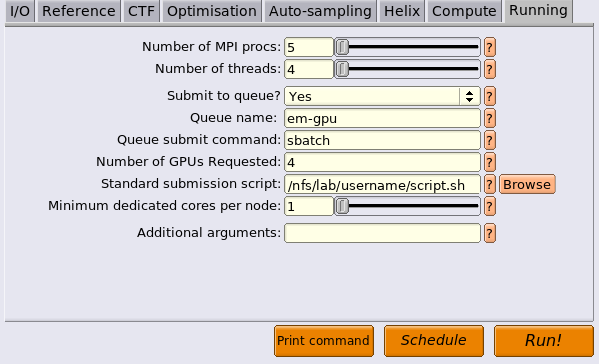
- CPU-only jobs: set the queue name to your CPU partition (e.g.
em-cpu) and Number of GPUs Requested to0. - MPI and threads: 5 MPI processes × 4 threads (20 CPUs) is a reasonable starting point for most jobs. Adjust to suit the job and what's free in the queue.
Helpful commands for managing your job
| command | usage | function |
|---|---|---|
| sbatch | sbatch <job script> |
Submit a batch job to the queue |
| squeue | squeue |
Show status of Slurm batch jobs |
| scancel | scancel *JOBID* |
Cancel job |
| sinfo | sinfo |
Show information about partitions |
| scontrol | scontrol show job *JOBID* |
Check the status of a running or idle job |
| sinfo (detailed) | sinfo -N -O nodelist,StateCompact,cpusstate,gres,gresused -p <partition> -t idle,mix,alloc |
Show each node in a partition with its state, CPUs in use/idle, and GPUs available/in use |
Further Reading
- HMS O2: Using Slurm Basic: a good general primer on Slurm.